Parasolid中创建Sheet有以下几种方式: 下面将对各种方法一一介绍。 Parasolid支持直接创建Sheet的种类I有以下几个: Ⅰ.圆形薄板:Circle Sheet Ⅱ.矩形薄板:Rectangle Sheet Ⅲ.正多边形薄板:Polygon Sheet Ⅳ.平面非规则N边形薄板:Planar Sheet 指定圆的半径和薄板的坐标系来创建。 指定矩形长宽和薄板的坐标系来创建。 指定正多边形的外接圆半径、边的数量以及薄板的坐标系来创建。 在指定平面上,使用若干个点来创建封闭的多边形薄板。上一节介绍了如何使用Parasolid API创建点和线框,以及介绍了薄板(Sheet)的相关概念。 Parasolid中想通过拉伸、放样等算法来创建封闭实体,轮廓必须是Sheet而不能直接使用Face,如果想使用Face也必须将其转成Sheet后才能运算。
二、薄板的各种创建方法
2.1 直接创建Sheet
2.1.1 创建圆形Sheet
PK_ERROR_code_t      PK_BODY_create_sheet_circle
(
--- received arguments ---
double               radius,       --- radius of circle (>0)
const PK_AXIS2_sf_t *basis_set,    --- position and orientation (may be NULL)

--- returned arguments ---
PK_BODY_t     *const body          --- sheet body returned
)PK_AXIS2_sf_t axis;
axis.location = { -10,0,5 };
axis.axis = { 0, 0, 1 };
axis.ref_direction = { 0, 1, 0 };
PK_BODY_t sheet = PK_ENTITY_null;
PK_ERROR_code_t err = PK_BODY_create_sheet_circle(5, &axis, &sheet);2.1.2 创建矩形Sheet
PK_ERROR_code_t      PK_BODY_create_sheet_rectangle
(
--- received arguments ---
double               x,            --- x dimension of rectangle (>0)
double               y,            --- y dimension of rectangle (>0)
const PK_AXIS2_sf_t *basis_set,    --- position and orientation (may be NULL)

--- returned arguments ---
PK_BODY_t     *const body          --- sheet body returned
)PK_AXIS2_sf_t axis;
axis.location = { 0, 0, 5 };
axis.axis = { 0,0,1 };
axis.ref_direction = { 0, 1, 0 };
PK_BODY_t sheet = PK_ENTITY_null;
PK_ERROR_code_t err = PK_BODY_create_sheet_rectangle(3, 5, &axis, &sheet);2.1.3 创建正多边形Sheet
PK_ERROR_code_t      PK_BODY_create_sheet_polygon
(
--- received arguments ---
double               radius,       --- radius of polygon (>0)
int                  n_sides,      --- number of sides of polygon (>2)
const PK_AXIS2_sf_t *basis_set,    --- position and orientation (may be NULL)

--- returned arguments ---
PK_BODY_t     *const body          --- sheet body returned
)PK_AXIS2_sf_t axis;
axis.location = { 10, 0, 5 };
axis.axis = { 0, 0, 1 };
axis.ref_direction = { 0, 1, 0 };
PK_BODY_t sheet = PK_ENTITY_null;
PK_ERROR_code_t err = PK_BODY_create_sheet_polygon(4, 5, &axis, &sheet);2.1.4 创建平面多边形Sheet
PK_ERROR_code_t                        PK_BODY_create_sheet_planar
(
--- received arguments ---
int                                    n_vectors,  --- number of position
                                                   --- vectors
const PK_VECTOR_t                      vectors[],  --- position vectors
                                                   --- at vertices
const PK_BODY_create_sheet_planar_o_t *options,    --- option structure

--- returned arguments ---
PK_BODY_t                             *const body  --- sheet body returned
)PK_VECTOR_t* vertices = new PK_VECTOR_t[4];
vertices[0] = { -1, 4, 5 };
vertices[1] = { 3, 5, 5 };
vertices[2] = { 5, 8, 5 };
vertices[3] = { 0, 9, 5 };
PK_BODY_create_sheet_planar_o_t sheet_planar_o;
sheet_planar_o.basis_set.location = { 0,0,5 };
sheet_planar_o.plane.location = { 0,0,5 };
PK_BODY_create_sheet_planar_o_m(sheet_planar_o);
PK_BODY_t sheet = PK_ENTITY_null;
PK_ERROR_code_t err = PK_BODY_create_sheet_planar(4, vertices, &sheet_planar_o, &sheet);2.1.5 创建结果预览
通过在一个几何曲面上,使用UV外包盒来裁切区域进而生成薄板。由于UVBOX必然与曲面的实体坐标系相对齐,因此只能构造出相对规整的薄板。 Sheet由若干拓扑面组成,那自然支持使用拓扑面来创建Sheet,核心方法为PK_FACE_make_sheet_body。很多情况下我们需要从最简单的几何曲线解始,依次构造Edge-Face-Sheet。 其流程通常为: Ⅰ.用几何曲线生成线框(附带生成拓扑边), Ⅱ.用拓扑边来构建拓扑面。 Ⅲ.将几何曲面附加到拓扑面上。 Ⅲ.从拓扑面构造薄板。 其中第一步已在上一节内容中详细描述,下面补充其余几个步骤。 通过裁切既有薄板可以生成形状各异、复杂的薄板,修剪过程主要包括下面两个步骤: Ⅰ.将曲线压印(imprint)到拓扑面上。 Ⅱ.使用拓扑边对薄板进行修剪。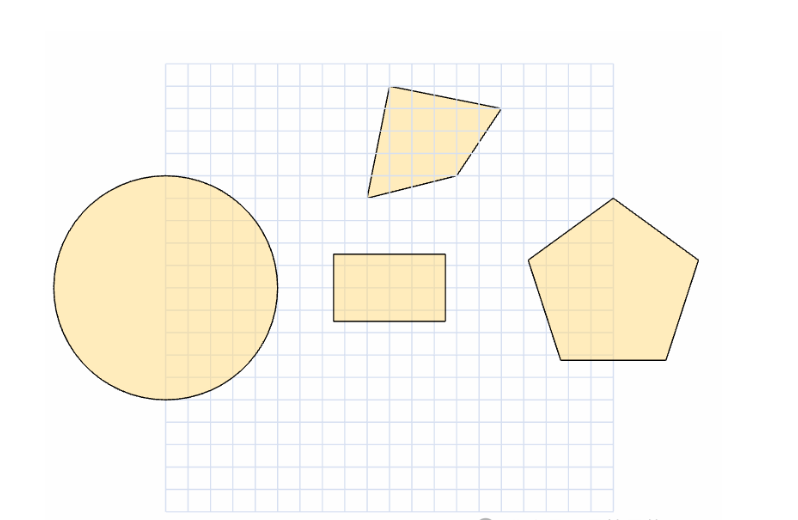
2.2 从几何曲面创建Sheet
PK_ERROR_code_t  PK_SURF_make_sheet_body
(
--- received arguments ---
PK_SURF_t        surf,      --- surf
PK_UVBOX_t       uv_box,    --- extent of surf

--- returned arguments ---
PK_BODY_t *const body       --- sheet body returned
)PK_SPHERE_sf_t sphere_sf;
sphere_sf.radius = 10;
sphere_sf.basis_set.location = { 0,0,0 };
sphere_sf.basis_set.axis = { 0,0,1 };
sphere_sf.basis_set.ref_direction = { 1,0,0 };
PK_SPHERE_t sphere = PK_ENTITY_null;
PK_ERROR_code_t err = PK_SPHERE_create(&sphere_sf, &sphere);
PK_UVBOX_t sphere_uvbox;
err = PK_SURF_ask_uvbox(sphere, &sphere_uvbox);
sphere_uvbox.param[1] = 0;
PK_BODY_t sphere_sheet = PK_ENTITY_null;
err = PK_SURF_make_sheet_body(sphere, sphere_uvbox, &sphere_sheet);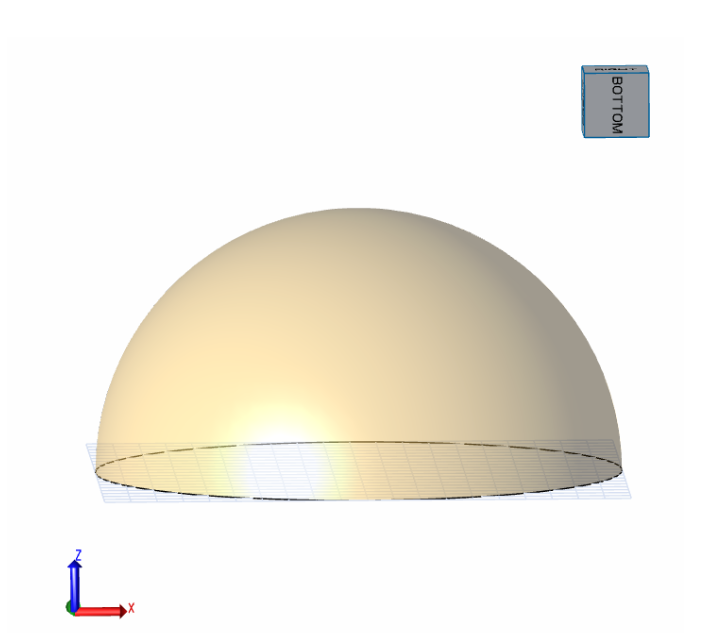
2.3 从拓扑面创建Sheet
PK_ERROR_code_t  PK_EDGE_make_faces_from_wire
(
--- received arguments ---
int                 n_edges,           --- number of edges
const PK_EDGE_t     edges[],           --- initial wireframe edges
const PK_LOGICAL_t  senses[],          --- senses of initial fins
const int           shared_loop[],     --- mapping from loops to faces

--- returned arguments ---
PK_FACE_t           new_faces[]        --- new faces created
)PK_linkage_m PK_ERROR_code_t PK_FACE_attach_surf_fitting
(
/* received */
PK_FACE_t /*face*/, /* face */
PK_LOGICAL_t /*local_check*/, /* whether to perform local check */
/* returned */
PK_local_check_t *const /*local_check_result*/ /* result of local check */
);
/*
This function creates a surface to fit and attach to face
*/
PK_linkage_m PK_ERROR_code_t PK_FACE_attach_surfs
(
/* received */
int /*n_faces*/, /* number of faces */
const PK_FACE_t /*faces*/[], /* faces to have surfaces attached */
const PK_SURF_t /*surfs*/[], /* surfaces to be attached to faces */
const PK_LOGICAL_t /*senses*/[] /* face senses */
);
/*
This function attaches surfaces to faces.
*/PK_ERROR_code_t PK_FACE_make_sheet_body
(
--- received arguments ---
int n_faces, --- number of faces
const PK_FACE_t faces[], --- array of faces
--- returned arguments ---
PK_BODY_t *const body --- sheet body
)1.4 修剪Sheet
PK_linkage_m PK_ERROR_code_t PK_BODY_imprint_cus_vector
(
/* received */
PK_BODY_t                              /*body*/,          /* a body */
int                                    /*n_curves*/,      /* number of curves */
const PK_CURVE_t                       /*curves*/[],      /* curves */
const PK_INTERVAL_t                    /*intervals*/[],   /* parametric intervals */
double                                 /*tol*/,           /* tolerance */
const PK_VECTOR_t                      /*direction*/,     /* direction to project */
const PK_BODY_imprint_cus_vector_o_t * /*options*/,       /* options */
/* returned */
PK_TOPOL_track_r_t             *const  /*tracking*/       /* tracking information */
);PK_ERROR_code_t PK_BODY_trim
(
--- received arguments ---
PK_BODY_t body, --- a body
int n_edges, --- number of edges
const PK_EDGE_t edges[], --- edges
int n_faces, --- number of faces
const PK_FACE_t faces[], --- faces
PK_LOGICAL_t keep
)
This function trims the body which must be a sheet.PK_AXIS2_sf_t axis;
axis.location = {0,0,0};
axis.axis = { 0, 0, 1 };
axis.ref_direction = { 1, 0, 0 };
PK_BODY_t circ_sheet = 0;
PK_ERROR_code_t err = PK_BODY_create_sheet_circle(10, &axis, &circ_sheet);
PK_FACE_t circ_face = PK_ENTITY_null;
err = PK_BODY_ask_first_face(circ_sheet, &circ_face);
PK_EDGE_t circ_edge = PK_ENTITY_null;
err = PK_BODY_ask_first_edge(circ_sheet, &circ_edge);
PK_ELLIPSE_t hole_ellipse = 0;
PK_ELLIPSE_sf_t hole_ellipse_sf;
hole_ellipse_sf.R1 = 8;
hole_ellipse_sf.R2 = 4;
hole_ellipse_sf.basis_set.location = { 0,0,5 };
hole_ellipse_sf.basis_set.axis = { 0, 0, 1 };
hole_ellipse_sf.basis_set.ref_direction = { 1, 0, 0 };
err = PK_ELLIPSE_create(&hole_ellipse_sf, &hole_ellipse);
PK_BODY_imprint_cus_vector_o_t imprint_o;
PK_BODY_imprint_cus_vector_o_m(imprint_o);
PK_TOPOL_track_r_t track;
PK_INTERVAL_t intervals[1] = { 0,2 * M_PI };
err = PK_BODY_imprint_cus_vector(circ_sheet, 1, &hole_ellipse, intervals, 0.0001, { 0,0,-1 }, &imprint_o, &track);
PK_EDGE_t tool_edge = (PK_EDGE_t)(track.track_records[0].product_topols[0]);
err = PK_BODY_trim(circ_sheet, 1, &tool_edge, 1, &circ_face, true);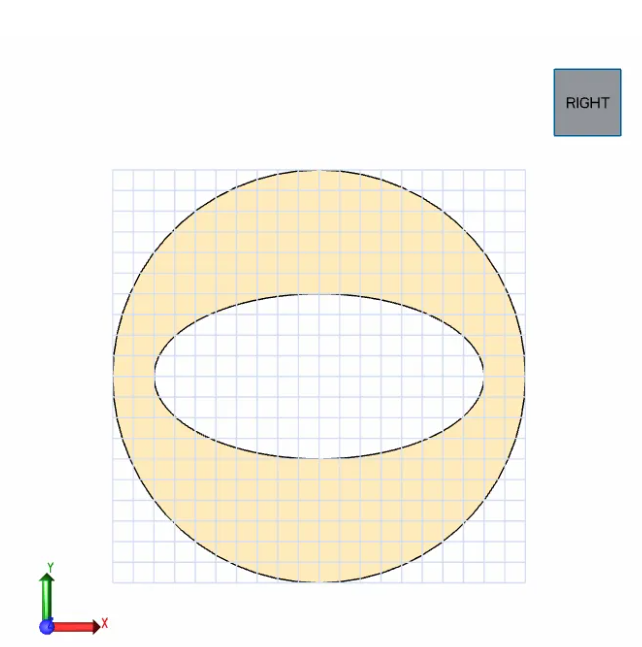
转载请注明来源本文地址:https://m.tuituisoft/gongyesheji/250124.html